Hướng Dẫn Đồng bộ Order xuống Central Order View (COV)
Phiên bản: v1.5
Ngày phát hành: 11/03/2026
Changelog (v1.5):
- Bổ sung
order.seller_merchant_id(optional) để hỗ trợ filter/reporting theo seller trong mô hình marketplace/multi-seller. - Cập nhật secure_hash cho event
order.created: append độngseller_merchant_idtheo thứ tự alphabet khi có giá trị. - Bổ sung Product Type
BILLING_PAYMENT- Dịch vụ thanh toán hóa đơn. - Bổ sung Product Type
PROMOTION_PURCHASE- Dịch vụ mua voucher/khuyến mãi.
Changelog (v1.4):
- Bổ sung
order.items[].category_codevàorder.items[].category_name(optional) - mã và tên danh mục/ngành hàng, đồng bộ với Payment/init-payment. - Bổ sung
order.items[].sub_items[].category_codevàorder.items[].sub_items[].category_name(optional) - tương tự cho sub item. - Bổ sung
order.category_codevàorder.category_name(optional) cho case 0 SKU hoặc khi cần phân loại ở cấp đơn hàng. - Deprecated:
order.items[].item_categoryvàorder.items[].sub_items[].item_category— ưu tiên dùngcategory_code+category_name. Field cũ vẫn được hỗ trợ để tương thích ngược.
Changelog (v1.3):
- Bổ sung
order.promotion_infos[].voucher_idvàorder.promotion_infos[].campaign_id(optional) - ID voucher và campaign trong hệ thống PnL, hỗ trợ tracking và audit trail. - Bổ sung
order.promotion_infos[].campaign_name(optional) - Tên campaign/chiến dịch khuyến mãi, phục vụ hiển thị và báo cáo.
Changelog (v1.2): Ngày phát hành: 29/11/2025
- Bổ sung
order.business_unit_idvàorder.branch_id(optional) - các giá trị được thống nhất và khai báo để định danh ở hệ thống kế toán chung. Bắt buộc với PnL onboard SAP/BI/..., optional với các PnL khác - Thêm
branch_idvàbusiness_unit_idvào secure_hash cho eventorder.created(append động vào cuối chuỗi nếu có giá trị) - tương tự như phía Payment. - Bổ sung
order.image_url(optional) - ảnh minh họa cho order, dùng cho Order Card trên SuperApp. - Bổ sung
order.attributes(optional) - thuộc tính mô tả order để hiển thị trên UI (pickup_location, dropoff_location, estimated_duration, delivery_date...). Đặc biệt hữu ích cho case 0 SKU khi không có items. Phân biệt vớiorder.metadata(thông tin nghiệp vụ/quản lý). - Bổ sung Product Type
AFTER_SALES(Hậu mãi Vinfast) - dịch vụ hậu mãi, bảo hành, sửa chữa xe VinFast. - Bổ sung
order.transactions[].note(optional) - ghi chú/ngữ cảnh cho từng giao dịch (VD: mục đích thanh toán, lý do hủy, v.v.) để hỗ trợ audit trail và hiển thị trên UI. - Đổi tên Product Type từ
VINFAST_PURCHASEthànhCAR_PURCHASE- để generic hơn, không chỉ giới hạn cho VinFast.
Changelog (v1.1): Ngày phát hành: 25/11/2025
- Bổ sung
order.order_name, bắt buộcorder.order_type,order.deeplink, cập nhật mô tảcreated_by. order.itemschuyển optional (support 0 SKU) + hướng dẫn hiển thị Order Card, thêm ảnh minh họa.- Mở rộng schema
order.fees(metadata, description note) vàorder.promotion_infos(list). - Làm rõ format
metadata,attributes,extra_datatheo từngorder_type. - Thêm
order.pnl_order_status_labelđể PnL truyền tên trạng thái gốc phục vụ hiển thị trên SuperApp (nếu cần). - Cập nhật Order/Payment lifecycle (mermaid) để hỗ trợ reopen/partial adjust + note scenario GSM.
- Thêm Retry Mechanism (section 8.6) và giải thích chiến lược retry với event_timestamp gốc/mới.
- Định nghĩa domain values cho
order.transactions[].statusvà các lưu ý khác về các field.
1. Tổng Quan
Central Order View (COV) là hệ thống tập trung thu thập, chuẩn hóa và đồng bộ trạng thái đơn hàng + thanh toán từ tất cả các PnL của Vingroup.
Kiến trúc tổng thể:
┌─────────────────────────────────────────────────────────────────────────┐
│                            PnL SYSTEMS                                  │
│  ┌──────────┐  ┌──────────┐  ┌──────────┐  ┌──────────┐  ┌──────────┐   │
│  │ VinFast  │  │ VinHomes │  │ VinPearl │  │   GSM    │  │          │   │
│  │  Order   │  │  Order   │  │  Order   │  │  Order   │  │  ...     │   │
│  │ Backend  │  │ Backend  │  │ Backend  │  │ Backend  │  │          │   │
│  └────┬─────┘  └────┬─────┘  └────┬─────┘  └────┬─────┘  └────┬─────┘.  │
└───────┼─────────────┼─────────────┼─────────────┼─────────────┼────────┘
        │             │             │             │             │
        └─────────────┴─────────────┴─────────────┴─────────────┘

                         Webhooks (3 events)
                   order.created | order.updated | order.cancelled
                                    │
                                    ▼
        ┌───────────────────────────────────────────────────────┐
        │                    MULESOFT ESB                       │
        │         (Routing, Authentication, Logging)            │
        └───────────────────────┬───────────────────────────────┘
                                │
                                ▼
        ┌───────────────────────────────────────────────────────┐
        │              CENTRAL ORDER VIEW (COV)                 │
        │                                                       │
        │  ┌─────────────┐  ┌──────────────┐  ┌──────────────┐  │
        │  │  Webhook    │  │   Event      │  │   Storage    │  │
        │  │  Ingestion  │→ │  Processing  │→ │  (Database)  │  │
        │  └─────────────┘  └──────────────┘  └──────────────┘  │
        └───────────────────────┬───────────────────────────────┘
                                │
                    ┌───────────┴───────────┐
                    │                       │
                    ▼                       ▼
        ┌─────────────────────┐   ┌─────────────────────┐
        │      V-PORTAL       │   │     SUPER APP       │
        │  (Internal Portal)  │   │  (Customer App)     │
        │                     │   │                     │
        │  • Order tracking   │   │  • My Orders        │
        │  • Dashboard        │   │  • Order status     │
        │  • Analytics        │   │  • Order history    │
        │  • Reports          │   │  • Notifications    │
        └─────────────────────┘   └─────────────────────┘
PnL là Source of Truth → COV chỉ lưu snapshot theo sự kiện và hiển thị thông tin lên VPortal + SuperApp.
Bắt buộc đẩy 3 webhook sau:
| Event | Khi nào gửi |
|---|---|
order.created | Đơn hàng mới được tạo thành công |
order.updated | Có bất kỳ thay đổi nào (status, payment, items, fees, metadata…) |
order.cancelled | Đơn hàng bị hủy (bởi khách hoặc hệ thống) |
2. Endpoint (qua MuleSoft)
Quan trọng: Tất cả requests phải gọi qua MuleSoft, không được gọi trực tiếp tới COV.
2.1 Internal (PnL)
Kết nối Internal dành cho các PnL trong Vingroup.
Base URL theo môi trường:
| Môi trường | Base URL |
|---|---|
| DEV | {MULE_INTERNAL_BASE_URL}/order/cov/ |
| SIT | {MULE_INTERNAL_BASE_URL}/sit/order/cov/ |
| UAT | {MULE_INTERNAL_BASE_URL}/uat/order/cov/ |
| Production | {MULE_INTERNAL_PROD_URL}/order/cov/ |
Webhook Endpoints:
Thay {BASE_URL} bằng Base URL tương ứng môi trường trong bảng trên.
POST {BASE_URL}/webhook/v1/orders/created
POST {BASE_URL}/webhook/v1/orders/updated
POST {BASE_URL}/webhook/v1/orders/cancelled
Lưu ý: Với môi trường Production, các bên kết nối sẽ được team Mule cấp key riêng (client_id và client_secret).
2.2 External (Đối tác)
Kết nối External dành cho các đối tác bên ngoài Vingroup. Chỉ hỗ trợ 2 môi trường: Production và UAT.
Base URL theo môi trường:
| Môi trường | Base URL |
|---|---|
| UAT | https://test-api.vingroup.net:7445/order/cov/ |
| Production | https://api-cloud.vingroup.net/order/cov/ |
Webhook Endpoints:
UAT Environment:
POST https://test-api.vingroup.net:7445/order/cov/webhook/v1/orders/created
POST https://test-api.vingroup.net:7445/order/cov/webhook/v1/orders/updated
POST https://test-api.vingroup.net:7445/order/cov/webhook/v1/orders/cancelled
Production Environment:
POST https://api-cloud.vingroup.net/order/cov/webhook/v1/orders/created
POST https://api-cloud.vingroup.net/order/cov/webhook/v1/orders/updated
POST https://api-cloud.vingroup.net/order/cov/webhook/v1/orders/cancelled
Yêu cầu kết nối External:
- Tất cả các request từ đối tác external cần cung cấp danh sách IPs để whitelist
- Phía Mule sẽ cấp
client_idvàclient_secretriêng cho từng đối tác - Có whitelist và limit access theo endpoint
3. Common Headers (bắt buộc)
3.1 Headers cho MuleSoft + COV
| Header | Required | Mô tả | Ví dụ |
|---|---|---|---|
Content-Type | Yes | Luôn là JSON | application/json |
client_id | Yes | MuleSoft client ID | YOUR_CLIENT_ID |
client_secret | Yes | MuleSoft client secret | YOUR_CLIENT_SECRET |
X-API-Key | Yes | API Key do COV cấp riêng cho từng Business Unit | ak_live_a8b7c6d5e4f3g2h1i0j9k8l7m6n5o4p3 |
X-Request-Id | Yes | UUID v4 duy nhất cho mỗi request (idempotency) | 550e8400-e29b-41d4-a716-446655440000 |
Ví dụ gọi webhook order.created qua MuleSoft:
curl --location '{MULE_INTERNAL_BASE_URL}/sit/order/cov/webhook/v1/orders/created' \
  --header 'Content-Type: application/json' \
  --header 'client_id: YOUR_CLIENT_ID' \
  --header 'client_secret: YOUR_CLIENT_SECRET' \
  --header 'X-API-Key: ak_test_xxxxxxxxxxxxxxxxxxxxxxxxxxxxxxxx' \
  --header 'X-Request-Id: 550e8400-e29b-41d4-a716-446655440000' \
  --data '{
    "secure_hash": "…",
    "event_timestamp": 1731578400000,
    "platform_code": "v-app",
    "miniapp_id": "vinfast_sales",
    "order": {
      "order_id": "VF-ORDER-001",
      "order_type": "EV_AND_CHARGING",
      "status": "IN_PROGRESS"
    }
  }'
Lưu ý:
client_id,client_secret- dùng để authenticate với MuleSoftX-API-Key- dùng để authenticate với COV (sau khi qua MuleSoft)- Mỗi PnL sẽ được cấp cả 2 bộ credentials: MuleSoft credentials (chung) + COV API Keys (theo VSF Merchants)
3.2 API Key & Secret Key
Quan trọng: COV sẽ cấp 1 cặp apiKey/secretKey cho mỗi VSF Merchant (mỗi Merchant map 1:1 với một mã SAP Partner Code thuộc Organization). Một Organization có thể có N cặp key nếu có N Merchant/SAP Partner Code. Để xác định được đơn hàng thuộc cơ sở/chi nhánh kinh doanh nào và sync đúng xuống SAP/các hệ thống phía sau, các PnL cần truyền business_unit_id và branch_id trong event order.created.
Lưu ý: Thông tin này chỉ cần truyền trong event order.created và không chỉnh sửa được sau khi đơn hàng đã được tạo.
Cấu trúc:
OrderBackend → 1 cặp (apiKey + secretKey)
Lưu ý:
- Mỗi hệ thống OrderBackend của PnL sẽ được cấp 1 cặp
apiKey/secretKeyduy nhất apiKeyđược dùng trong headerX-API-Keyđể authenticate với COVsecretKeyđược dùng để tínhsecureHashcho tất cả các webhook eventsbusiness_unit_idvàbranch_idđược truyền trong eventorder.createdđể COV và các hệ thống phía sau xác định được đơn hàng thuộc cơ sở/chi nhánh kinh doanh nào- API Key format:
ak_{env}_{random_32_chars}env:live(production) hoặctest(staging/UAT)random_32_chars: chuỗi random 32 ký tự- Ví dụ:
ak_live_a8b7c6d5e4f3g2h1i0j9k8l7m6n5o4p3
Quy trình cung cấp Key:
-
PnL cung cấp thông tin:
- Thông tin hệ thống OrderBackend cần tích hợp
- Môi trường: Production hoặc Staging/UAT
-
COV team cấp credentials:
- MuleSoft credentials:
- Với môi trường DEV/SIT/UAT: shared cho toàn bộ Organization
- Với môi trường Production: team Mule sẽ cấp key riêng (
client_idvàclient_secret) cho từng bên kết nối client_idclient_secret
- MuleSoft credentials:
- COV credentials:
- 1 cặp
apiKey/secretKeycho mỗi VSF Merchant (mỗi Merchant tương ứng 1 mã SAP Partner Code thuộc Organization). Một Organization có thể nhận N cặp key nếu có N Merchant/SAP Partner Code.
- 1 cặp
- PnL implementation (mô hình cấp key):
- Onboard theo Organization. Một Organization có thể có nhiều mã SAP Partner Code (companyCode).
- Mỗi SAP Partner Code map 1:1 với VSF Merchant.
- Mỗi VSF Merchant được cấp 1 cặp
apiKey/secretKeytrên COV (tương ứng 1 mã SAP Partner Code). - Order Backend cần lưu:
- 1 bộ MuleSoft credentials (shared theo môi trường)
- N cặp
apiKey/secretKeyCOV (mỗi cặp cho 1 VSF Merchant/SAP Partner Code)
- Khi gửi webhook:
- Dùng MuleSoft credentials để authenticate với MuleSoft
- Chọn đúng
apiKeycủa Merchant tương ứng để set headerX-API-Key - Dùng
secretKeycủa Merchant đó để tínhsecureHash - Optional: Truyền
business_unit_idvàbranch_idtrong eventorder.createdđể COV và các hệ thống phía sau xác định được đơn hàng thuộc cơ sở/chi nhánh kinh doanh nào. Lưu ý: Thông tin này chỉ cần truyền trong eventorder.createdvà không chỉnh sửa được sau khi đơn hàng đã được tạo.
4. Bảo mật – secureHash (HMAC-SHA256)
Mọi request phải có field secureHash (64 ký tự hex lowercase).
Công thức:
secure_hash = HMAC_SHA256(secret_key, string_to_sign).toHexLowerCase()
- secret_key: do COV cấp cùng
X-API-Key - string_to_sign: lấy giá trị của các field theo thứ tự alphabet của tên field, nối bằng
|(pipe)
Lưu ý về event_timestamp:
- Format: Unix timestamp (milliseconds) - long value
- Ví dụ:
1731578400000(tương đương2025-11-14T10:00:00Z)
Các field tham gia string_to_sign:
order.created
Công thức: Các field được sắp xếp theo thứ tự alphabet của tên field:
| Thứ tự | Field Name | Lấy giá trị từ | Ví dụ | Ghi chú |
|---|---|---|---|---|
| 1 | branch_id | order.branch_id | BR_HN_001 | (Optional) Chỉ append nếu có giá trị |
| 2 | business_unit_id | order.business_unit_id | BU_VINFAST_001 | (Optional) Chỉ append nếu có giá trị |
| 3 | event_timestamp | event_timestamp | 1731578400000 | Unix timestamp (milliseconds) |
| 4 | grand_total | order.amounts.grand_total | 36200000 | Số tiền user cần thanh toán |
| 5 | miniapp_id | miniapp_id | vinfast_sales | MiniApp ID trong SuperApp |
| 6 | order_id | order.order_id | VF-ORDER-001 | |
| 7 | platform_code | platform_code | v-app | |
| 8 | seller_merchant_id | order.seller_merchant_id | SELLER_MERCHANT_001 | (Optional) Chỉ append nếu có giá trị |
| 9 | total_amount | order.amounts.total_amount | 36200000 | Tổng giá trị đơn hàng (trước KM) |
Ví dụ string_to_sign:
Không có branch_id và business_unit_id:
1731578400000|36200000|vinfast_sales|VF-ORDER-001|v-app|36200000
Có branch_id, không có business_unit_id:
BR_HN_001|1731578400000|36200000|vinfast_sales|VF-ORDER-001|v-app|36200000
Có cả branch_id và business_unit_id:
BR_HN_001|BU_VINFAST_001|1731578400000|36200000|vinfast_sales|VF-ORDER-001|v-app|36200000
Có branch_id, business_unit_id và seller_merchant_id:
BR_HN_001|BU_VINFAST_001|1731578400000|36200000|vinfast_sales|VF-ORDER-001|v-app|SELLER_MERCHANT_001|36200000
Lưu ý:
- Nếu có khuyến mãi thì
grand_total<total_amount, nếu không có KM thì bằng nhau. branch_id,business_unit_idvàseller_merchant_idchỉ cần truyền trong eventorder.createdvà chỉ append vào secure_hash khi có giá trị.
order.updated
Trường hợp 1: Có grand_total và total_amount
| Thứ tự | Field Name | Lấy giá trị từ | Ví dụ | Ghi chú |
|---|---|---|---|---|
| 1 | event_timestamp | event_timestamp | 1731582000000 | Unix timestamp (milliseconds) |
| 2 | grand_total | order.amounts.grand_total | 80200000 | Số tiền user cần thanh toán |
| 3 | order_id | order.order_id | VF-ORDER-001 | |
| 4 | total_amount | order.amounts.total_amount | 80200000 | Tổng giá trị đơn hàng (trước KM) |
string_to_sign:
1731582000000|80200000|VF-ORDER-001|80200000
Trường hợp 2: Không có amounts (không update giá)
| Thứ tự | Field Name | Lấy giá trị từ | Ví dụ |
|---|---|---|---|
| 1 | event_timestamp | event_timestamp | 1731582000000 |
| 2 | order_id | order.order_id | VF-ORDER-001 |
string_to_sign:
1731582000000|VF-ORDER-001
order.cancelled
| Thứ tự | Field Name | Lấy giá trị từ | Ví dụ |
|---|---|---|---|
| 1 | event_timestamp | event_timestamp | 1731598200000 |
| 2 | order_id | order.order_id | VF-ORDER-001 |
string_to_sign:
1731598200000|VF-ORDER-001
Ví dụ code tính secureHash (Go):
import (
    "crypto/hmac"
    "crypto/sha256"
    "encoding/hex"
    "fmt"
    "strings"
    "time"
)

func calculateSecureHash(secretKey string, fields ...string) string {
    stringToSign := strings.Join(fields, "|")
    h := hmac.New(sha256.New, []byte(secretKey))
    h.Write([]byte(stringToSign))
    return hex.EncodeToString(h.Sum(nil))
}

// Sử dụng cho order.created
secretKey := "your_secret_key"
eventTimestamp := time.Now().UnixMilli() // 1731578400000

// Sắp xếp fields theo thứ tự alphabet
fields := []string{}

// 1. branch_id (nếu có)
if branchId := order.BranchId; branchId != "" {
    fields = append(fields, branchId)
}

// 2. business_unit_id (nếu có)
if businessUnitId := order.BusinessUnitId; businessUnitId != "" {
    fields = append(fields, businessUnitId)
}

// 3. event_timestamp
fields = append(fields, fmt.Sprintf("%d", eventTimestamp))

// 4. grand_total
fields = append(fields, "36200000")

// 5. miniapp_id
fields = append(fields, "vinfast_sales")

// 6. order_id
fields = append(fields, "VF-ORDER-001")

// 7. platform_code
fields = append(fields, "v-app")

// 8. seller_merchant_id (nếu có)
if sellerMerchantId := order.SellerMerchantId; sellerMerchantId != "" {
    fields = append(fields, sellerMerchantId)
}

// 9. total_amount
fields = append(fields, "36200000")

secureHash := calculateSecureHash(secretKey, fields...)
5. Chi Tiết 3 Webhook
LƯU Ý QUAN TRỌNG:
-
Schema linh hoạt: Không phải tất cả PnL đều có đầy đủ thông tin như example. Mỗi PnL chỉ gửi những field có giá trị thực tế.
-
Extensibility:
order.metadata- Lưu thông tin bổ sung của PnL (dạng key-value)items[].attributes- Thuộc tính sản phẩm tùy chỉnh (dạng key-value)promotion_infos[].extra_data- Thông tin bổ sung về promotion/voucher (dạng key-value)- Hệ thống COV sẽ lưu trữ và trả về nguyên trạng các metadata/attributes/extra_data này
Naming convention:
metadata: dùng cho thông tin mở rộng ở cấp order hoặc fee, thể hiện các thuộc tính nghiệp vụ/quản lý (dealer_code, sales_agent, vat_rate, contract_type...). Dùng cho mục đích quản lý và audit trail.attributes: dùng cho thông tin mô tả chi tiết để hiển thị trên UI:
- Ở cấp order: thuộc tính mô tả order (pickup_location, dropoff_location, estimated_duration, delivery_date...). Đặc biệt hữu ích cho case 0 SKU.
- Ở cấp item/sub_item: thuộc tính sản phẩm (color, model, SKU, VIN, vehicle_type...).
extra_data: dùng cho các object đặc thù nhưpromotion_infos[]hoặc các cấu trúc domain-specific khác cần bổ sung thêm key-value.
Việc phân tách này giúp client hiểu được scope của từng dữ liệu và render đúng trên UI.
-
miniapp_id: Bắt buộc gửi
miniapp_idđể xác định order được tạo từ MiniApp nào trong SuperApp ecosystem -
Chỉ gửi thông tin quan trọng: Tránh gửi dữ liệu dư thừa, chỉ gửi những field cần thiết cho nghiệp vụ
Ví dụ về tính linh hoạt:
// VinFast có thể gửi
{
  "order": {
    "items": [{
      "attributes": {
        "color": "red",
        "variant": "Premium",
        "vin_number": "VF8XXXXX"
      }
    }],
    "metadata": {
      "dealer_code": "VF_HN_001",
      "sales_agent": "VN001"
    }
  },
  "miniapp_id": "vinfast_sales"
}

// VinHomes có thể gửi
{
  "order": {
    "items": [{
      "attributes": {
        "project_name": "Vinhomes Ocean Park",
        "apartment_code": "OP-A1-1234",
        "floor": "15"
      }
    }],
    "metadata": {
      "broker_id": "BRK_001",
      "viewing_date": "2025-11-20"
    }
  },
  "miniapp_id": "vinhomes_booking"
}
5.1 order.created
POST /webhook/v1/orders/created
Required/Optional Fields:
| Field Path | Type | Required | Constraints | Index | Mô tả |
|---|---|---|---|---|---|
secure_hash | string | ✅ Yes | 64 ký tự (hex) | No | HMAC-SHA256 hash để verify |
event_timestamp | long | ✅ Yes | timestamp (ms) | Yes | Thời điểm event |
created_by | string | ✅ Yes | Max 128 ký tự | No | ID người tạo order. Yêu cầu: truyền đúng userId do VSF cung cấp cho MiniApp để SuperApp hiển thị & quản trị. Lưu ý: Với trường hợp đơn hàng do user tạo thì created_by chính là customer_id. |
platform_code | string | ✅ Yes | Max 64 ký tự | Yes | Mã platformcode tại VSF (VD SuperApp v-app) |
miniapp_id | string | ✅ Yes | Max 64 ký tự | Yes | MiniApp ID trong SuperApp |
order | object | ✅ Yes | -- | No | Thông tin đơn hàng |
order.order_id | string | ✅ Yes | Max 64 ký tự | Yes | Mã đơn hàng |
order.order_type | string | ✅ Yes | Max 64 ký tự | No | Loại đơn hàng - sử dụng một trong các Product Type enum values (xem section 8.3) |
order.order_name | string | ❌ No | Max 256 ký tự | No | Tên hiển thị chung cho order (dùng cho case 0 SKU hoặc order summary) |
order.category_code | string | ❌ No | Max 64 ký tự | No | Mã danh mục/ngành hàng ở cấp đơn hàng (optional; hữu ích cho case 0 SKU hoặc phân loại ở order-level) |
order.category_name | string | ❌ No | Max 256 ký tự | No | Tên danh mục/ngành hàng ở cấp đơn hàng (optional; đi kèm order.category_code) |
order.status | string | ✅ Yes | -- | No | Trạng thái đơn |
order.pnl_order_status | string | ✅ Yes | Max 64 ký tự | No | Mã trạng thái gốc của PnL (dạng code) |
order.pnl_order_status_label | string | ❌ No | Max 256 ký tự | No | Label hiển thị trạng thái theo hệ thống PnL (dùng cho UI SuperApp) |
order.payment_status | string | ✅ Yes | -- | No | Trạng thái thanh toán |
order.description | string | ❌ No | -- | No | Mô tả đơn hàng |
| Customer | |||||
order.customer | object | ✅ Yes | -- | No | Thông tin khách hàng |
order.customer.customer_id | string | ✅ Yes | Max 64 ký tự | No | Mã khách hàng. Yêu cầu: truyền đúng userId do VSF cung cấp cho MiniApp để SuperApp hiển thị & quản trị. |
order.customer.name | string | ✅ Yes | Max 128 ký tự | No | Tên khách hàng |
order.customer.phone | string | ❌ No | 10-11 số | No | Số điện thoại |
order.customer.email | string | ❌ No | Định dạng email | No | |
| Items | |||||
order.items | array | ❌ No | Min 1 item | No | Danh sách items (optional - hỗ trợ trường hợp 0 SKU) |
order.items[].item_id | string | ✅ Yes | Max 64 ký tự | No | Mã item |
order.items[].name | string | ✅ Yes | Max 256 ký tự | No | Tên item |
order.items[].quantity | integer | ✅ Yes | ≥ 1 | No | Số lượng |
order.items[].description | string | ❌ No | -- | No | Mô tả item |
order.items[].unit_price | number | ✅ Yes | ≥ 0 | No | Đơn giá |
order.items[].total_price | number | ✅ Yes | ≥ 0 | No | Tổng giá |
order.items[].item_type | string | ❌ No | -- | No | Loại item |
order.items[].item_category | string | ❌ No | -- | No | Deprecated. Nhóm item; ưu tiên dùng category_code + category_name (đồng bộ với Payment). Vẫn hỗ trợ để tương thích ngược. |
order.items[].category_code | string | ❌ No | Max 64 ký tự | No | Mã danh mục/ngành hàng (optional) |
order.items[].category_name | string | ❌ No | Max 256 ký tự | No | Tên danh mục/ngành hàng (optional) |
order.items[].currency | string | ✅ Yes | Max 8 ký tự | No | Đơn vị tiền |
order.items[].image_url | string | ❌ No | URL | No | Ảnh minh họa |
order.items[].attributes | object | ❌ No | key-value | No | Thuộc tính mở rộng |
| Sub Items | |||||
order.items[].sub_items | array | ❌ No | -- | No | Danh sách sub item |
order.items[].sub_items[].sub_item_id | string | ✅ Yes | Max 64 ký tự | No | Mã sub item |
order.items[].sub_items[].name | string | ✅ Yes | Max 256 ký tự | No | Tên sub item |
order.items[].sub_items[].quantity | integer | ✅ Yes | ≥ 1 | No | Số lượng sub item |
order.items[].sub_items[].description | string | ❌ No | -- | No | Mô tả sub item |
order.items[].sub_items[].unit_price | number | ✅ Yes | ≥ 0 | No | Đơn giá sub item |
order.items[].sub_items[].total_price | number | ✅ Yes | ≥ 0 | No | Tổng giá sub item |
order.items[].sub_items[].item_type | string | ❌ No | -- | No | Loại sub item |
order.items[].sub_items[].item_category | string | ❌ No | -- | No | Deprecated. Nhóm sub item; ưu tiên dùng category_code + category_name. Vẫn hỗ trợ để tương thích ngược. |
order.items[].sub_items[].category_code | string | ❌ No | Max 64 ký tự | No | Mã danh mục/ngành hàng (optional) |
order.items[].sub_items[].category_name | string | ❌ No | Max 256 ký tự | No | Tên danh mục/ngành hàng (optional) |
order.items[].sub_items[].currency | string | ✅ Yes | Max 8 ký tự | No | Đơn vị tiền sub item |
order.items[].sub_items[].image_url | string | ❌ No | URL | No | Ảnh sub item |
order.items[].sub_items[].attributes | object | ❌ No | key-value | No | Thuộc tính mở rộng |
| Fees | |||||
order.fees | array | ❌ No | -- | No | Danh sách phí |
order.fees[].fee_code | string | ❌ No | Max 64 ký tự | No | Mã loại phí (PnL define; optional vì một số bên không có) |
order.fees[].description | string | ❌ No | -- | No | Mô tả phí (khuyến nghị nhập để hiển thị chi tiết cho user khi không có fee_code) |
order.fees[].amount | number | ✅ Yes | ≥ 0 | No | Số tiền phí |
order.fees[].metadata | object | ❌ No | key-value | No | Thông tin bổ sung cho từng fee (VD: { "vat": "10%", "charge_type": "DELIVERY" }) |
| Promotion | |||||
order.promotion_infos | array | ❌ No | -- | No | Danh sách khuyến mãi/voucher áp dụng |
order.promotion_infos[].voucher_code | string | ❌ No | Max 64 ký tự | No | Mã voucher |
order.promotion_infos[].voucher_id | string | ❌ No | Max 64 ký tự | No | ID voucher trong hệ thống PnL |
order.promotion_infos[].campaign_id | string | ❌ No | Max 64 ký tự | No | ID campaign/chiến dịch khuyến mãi |
order.promotion_infos[].campaign_name | string | ❌ No | Max 255 ký tự | No | Tên campaign/chiến dịch khuyến mãi |
order.promotion_infos[].discount_type | string | ❌ No | Max 32 ký tự | No | Loại giảm giá |
order.promotion_infos[].discount_value | number | ❌ No | ≥ 0 | No | Giá trị giảm giá |
order.promotion_infos[].amount_before_discount | number | ❌ No | ≥ 0 | No | Tổng tiền trước giảm giá |
order.promotion_infos[].discount_amount | number | ❌ No | ≥ 0 | No | Số tiền giảm |
order.promotion_infos[].amount_after_discount | number | ❌ No | ≥ 0 | No | Tổng tiền sau giảm giá |
order.promotion_infos[].extra_data | object | ❌ No | key-value | No | Dữ liệu mở rộng |
| Transactions | |||||
order.transactions | array | ❌ No | -- | No | Danh sách giao dịch |
order.transactions[].transaction_id | string | ✅ Yes | Max 64 ký tự | No | Mã giao dịch |
order.transactions[].provider | string | ✅ Yes | Max 64 ký tự | No | Đơn vị thanh toán |
order.transactions[].method | string | ✅ Yes | Max 64 ký tự | No | Phương thức thanh toán |
order.transactions[].voucher_code | string | ❌ No | Max 64 ký tự | No | Mã voucher giao dịch |
order.transactions[].amount | number | ✅ Yes | ≥ 0 | No | Số tiền giao dịch |
order.transactions[].status | string | ✅ Yes | Max 32 ký tự | No | Trạng thái giao dịch. Domain values khuyến nghị: - PENDING: Đang chờ xử lý hoặc chờ user thanh toán- COMPLETED: Thanh toán thành công- FAILED: Thanh toán thất bại- CANCELLED: Giao dịch bị hủy |
order.transactions[].note | string | ❌ No | Max 512 ký tự | No | Ghi chú/ngữ cảnh cho giao dịch (VD: "Thanh toán lần 1 - đặt cọc", "Thanh toán bổ sung do đổi điểm đến", "Hủy do khách hàng yêu cầu", v.v.) |
order.transactions[].captured_at | long | ❌ No | timestamp (ms) | No | Thời điểm thanh toán |
| Amounts | |||||
order.amounts | object | ✅ Yes | -- | No | Thông tin số tiền |
order.amounts.currency | string | ✅ Yes | Max 8 ký tự | No | Đơn vị tiền |
order.amounts.total_amount | number | ✅ Yes | ≥ 0 | Yes | Tổng tiền đơn hàng |
order.amounts.paid_amount | number | ❌ No | ≥ 0, default: 0 | No | Số tiền đã thanh toán |
order.amounts.refunded_amount | number | ❌ No | ≥ 0, default: 0 | No | Số tiền đã hoàn |
order.amounts.grand_total | number | ✅ Yes | ≥ 0 | Yes | Tổng tiền cuối cùng (sau KM) |
| Metadata | |||||
order.metadata | object | ❌ No | key-value | No | Thông tin bổ sung về nghiệp vụ/quản lý (dealer_code, sales_agent, contract_type, vat_rate...). Dùng cho mục đích quản lý và audit trail. |
order.attributes | object | ❌ No | key-value | No | Thuộc tính mô tả order để hiển thị trên UI (pickup_location, dropoff_location, estimated_duration, delivery_date...). Đặc biệt hữu ích cho case 0 SKU khi không có items. |
| Links | |||||
order.deeplink | string | ✅ Yes | URL | No | Deeplink mở order của MiniApp trên SuperApp, COV trả nguyên trạng |
order.image_url | string | ❌ No | URL | No | Ảnh minh họa cho order (dùng cho Order Card trên SuperApp) |
| Business Location | |||||
order.business_unit_id | string | ❌ No | Max 64 ký tự | No | Mã cơ sở kinh doanh (Business Unit ID). Lưu ý: Giá trị này được thống nhất và khai báo để định danh ở hệ thống kế toán chung. COV và các hệ thống phía sau (SAP, Payment Hub, BI...) sẽ dùng giá trị này để xác định được đơn hàng thuộc cơ sở kinh doanh nào, phục vụ hạch toán & báo cáo. Chỉ cần truyền trong event order.created, không chỉnh sửa được sau khi đơn hàng đã được tạo. Bắt buộc với PnL onboard SAP/Payment Hub/BI. Với PnL không cần sync xuống các hệ thống phía sau, có thể bỏ trống. |
order.branch_id | string | ❌ No | Max 64 ký tự | No | Mã chi nhánh. Lưu ý: Giá trị này được thống nhất và khai báo để định danh ở hệ thống kế toán chung. COV và các hệ thống phía sau (SAP, Payment Hub, BI...) sẽ dùng giá trị này để xác định được đơn hàng thuộc chi nhánh nào, phục vụ hạch toán & báo cáo. Chỉ cần truyền trong event order.created, không chỉnh sửa được sau khi đơn hàng đã được tạo. Bắt buộc với PnL onboard SAP/Payment Hub/BI. Với PnL không cần sync xuống các hệ thống phía sau, có thể bỏ trống. |
order.seller_merchant_id | string | ❌ No | Max 64 ký tự | No | Mã merchant của seller để phục vụ filter/reporting/hạch toán theo seller trong mô hình marketplace/multi-seller. Trường này dùng cho phân loại dữ liệu đơn hàng, không thay đổi luồng tiền settlement. Khuyến nghị chỉ truyền trong order.created để giữ tính ổn định dữ liệu filter. |
Request Body Example:
{
  "secure_hash": "a8f5e2c1b9d4f3e7a6b8c9d0e1f2a3b4c5d6e7f8a9b0c1d2e3f4a5b6c7d8e9f0",
  "platform_code": "v-app",
  "miniapp_id": "vinfast_sales",
  "event_timestamp": 1731578400000,
  "order": {
    "order_id": "VF-ORDER-001",
    "order_type": "EV_AND_CHARGING",
    "order_name": "Đặt xe VinFast VF e34",
    "category_code": "CAT_CAR_PURCHASE",
    "category_name": "Car Purchase",
    "status": "IN_PROGRESS",
    "pnl_order_status": "VINFAST_WAITING_PAYMENT",
    "pnl_order_status_label": "Đang chờ thanh toán (VinFast)",
    "payment_status": "UNPAID",
    "description": "Đặt xe VF e34 bản Premium",
    "customer": {
      "customer_id": "CUST_1001",
      "name": "Nguyen Van A",
      "phone": "0901234567",
      "email": "[email protected]"
    },
    "delivery_address": {
      "recipient_name": "Nguyen Van A",
      "phone": "0901234567",
      "address_line1": "123 Đường Láng",
      "address_line2": "Tòa nhà FPT",
      "ward": "Láng Thượng",
      "city": "Hà Nội",
      "country": "Vietnam",
      "postal_code": "100000"
    },
    "items": [
      {
        "item_id": "ITEM001",
        "name": "Đặt xe VF e34",
        "quantity": 1,
        "description": "Đặt cọc xe bản Premium",
        "unit_price": 40000000,
        "total_price": 40000000,
        "item_type": "BOOKING",
        "item_category": "VEHICLE",
        "category_code": "CAT_ELECTRONICS",
        "category_name": "Electronics",
        "currency": "VND",
        "image_url": "https://cdn.vinfast.vn/e34.png",
        "attributes": {
          "color": "red",
          "variant": "Premium"
        },
        "sub_items": [
          {
            "sub_item_id": "SITM-01",
            "name": "Gói phụ kiện cơ bản",
            "item_category": "ACCESSORY",
            "category_code": "CAT_ACCESSORY",
            "category_name": "Accessory",
            "price": 0,
            "image_url": "https://cdn.vinfast.vn/e34.png"
          }
        ]
      }
    ],
    "fees": [
      {
        "fee_code": "DELIVERY_FEE",
        "description": "Phí giao xe tận nơi",
        "amount": 200000,
        "currency": "VND",
        "metadata": {
          "vat": "10%",
          "charge_type": "DELIVERY"
        }
      }
    ],
    "promotion_infos": [
      {
        "voucher_code": "VFSALE10",
        "voucher_id": "VOUCHER_12345",
        "campaign_id": "SUMMER2025",
        "campaign_name": "Summer Sale 2025",
        "discount_type": "PERCENTAGE",
        "discount_value": 10,
        "currency": "VND",
        "amount_before_discount": 40000000,
        "discount_amount": 4000000,
        "amount_after_discount": 36000000,
        "extra_data": {
          "promotion_channel": "SuperApp",
          "applied_by": "AUTO"
        }
      }
    ],
    "transactions": [
      {
        "transaction_id": "TRX_123457",
        "provider": "INTERNAL",
        "method": "VOUCHER",
        "currency": "VND",
        "voucher_code": "SALE50M",
        "amount": 50000000,
        "status": "COMPLETED",
        "note": "Thanh toán đặt cọc xe VF e34"
      }
    ],
    "amounts": {
      "currency": "VND",
      "total_amount": 36200000,
      "grand_total": 36200000,
      "paid_amount": 0,
      "refunded_amount": 0
    },
    "attributes": {
      "delivery_date": "2025-12-15",
      "delivery_method": "Giao tận nơi"
    },
    "metadata": {
      "sales_agent": "VN001",
      "booking_channel": "App VinFast"
    },
    "deeplink": "superapp://miniapp/vinfast_sales/orders/VF-ORDER-001",
    "image_url": "https://cdn.vinfast.vn/orders/vf-e34-order.png",
    "business_unit_id": "BU_VINFAST_001",
    "branch_id": "BR_HN_001",
    "seller_merchant_id": "SELLER_MERCHANT_001"
  }
}
Response Success (200 OK):
{
  "code": 0,
  "message": "Order created event received successfully",
  "data": {
    "correlationId": "5d83ced5-3ed8-457f-9669-33b9b3bb8736",
    "timestamp": 1763094301067,
    "orderId": "VF-ORDER-001",
    "platformCode": "VINFAST"
  }
}
Response Duplicate (200 OK):
{
  "code": 0,
  "message": "Event already processed",
  "data": {
    "correlationId": "5d83ced5-3ed8-457f-9669-33b9b3bb8736",
    "timestamp": 1763094301067,
    "orderId": "VF-ORDER-001",
    "platformCode": "VINFAST"
  }
}
5.2 order.updated (PATCH mode)
POST /webhook/v1/orders/updated
Mô tả:
Nhận event order.updated từ PnL khi có thay đổi về đơn hàng (status, payment, items, fees, metadata...).
LƯU Ý QUAN TRỌNG:
- Event chỉ gửi phần thay đổi (không cần gửi toàn bộ order)
- Nếu gửi
items→ Hệ thống DELETE toàn bộ items cũ và INSERT items mới - Nếu gửi
fees→ Hệ thống DELETE toàn bộ fees cũ và INSERT fees mới - Nếu gửi
transactions→ Hệ thống DELETE toàn bộ transactions cũ và INSERT transactions mới - Nếu KHÔNG gửi
items/fees/transactions→ Giữ nguyên data cũ (không thay đổi) event_timestampphải >updated_attrong DB → Reject nếu out-of-order (tránh ghi đè data mới bằng data cũ)
Update Mode:
| Mode | Behavior | Use Case |
|---|---|---|
PATCH | Update các field được gửi. Đặc biệt: nếu gửi items/fees/transactions → DELETE toàn bộ cũ + INSERT mới | Cập nhật một phần (khuyến nghị) |
REPLACE | Replace từng object/array được gửi lên (xóa fields cũ không có trong payload) | Sync lại một phần từ PnL |
Required/Optional Fields:
| Field Path | Required | Type | Mô tả |
|---|---|---|---|
secure_hash | ✅ Yes | string | HMAC-SHA256 hash |
event_timestamp | ✅ Yes | long | Unix timestamp (milliseconds) |
created_by | ✅ Yes | string | ID của người/hệ thống thực hiện hành động update |
order.order_id | ✅ Yes | string | Order ID (để xác định order cần update) |
update_mode | ❌ No | string | PATCH (default) hoặc REPLACE |
order.status | ❌ No | string | Update nếu có thay đổi |
order.payment_status | ❌ No | string | Update nếu có thay đổi |
order.amounts | ❌ No | object | Nếu gửi → phải có đầy đủ total_amount & grand_total |
order.items | ❌ No | array | Nếu gửi → DELETE & INSERT toàn bộ |
order.fees | ❌ No | array | Nếu gửi → DELETE & INSERT toàn bộ |
order.transactions | ❌ No | array | Nếu gửi → DELETE & INSERT toàn bộ |
order.attributes | ❌ No | object | Update thuộc tính mô tả order nếu có thay đổi |
order.metadata | ❌ No | object | Update thông tin nghiệp vụ/quản lý nếu có thay đổi |
order.image_url | ❌ No | string | Update ảnh minh họa cho order nếu có thay đổi |
order.* | ❌ No | any | Các fields khác - update theo mode |
Note:
created_bynên là ID chuẩn hoá (ví dụ:{ACCOUNT_ID}hoặc{SERVICE_NAME}) để phục vụ audit trail.
⚠️ Lưu ý đặc biệt:
- Nếu update giá (
amounts), bắt buộc phải gửi cảtotal_amountvàgrand_totalđể tínhsecure_hash - Nếu không update giá, không cần gửi
amounts→secure_hashkhông cótotal_amount&grand_total
Chi tiết Update Mode:
PATCH Mode (Khuyến nghị):
- Scalar fields (status, payment_status, description...): Update nếu có trong payload, giữ nguyên nếu không có
- Array fields (items, fees, transactions):
- Nếu có trong payload → DELETE toàn bộ cũ + INSERT mới
- Nếu không có trong payload → Giữ nguyên
- Nested objects (amounts, customer, delivery_address): Merge với data cũ (giữ lại fields không gửi)
Ví dụ PATCH:
// DB hiện tại có:
// - status="IN_PROGRESS"
// - customer={name: "A", phone: "123", email: "[email protected]", address: "HN", age: 30}
// - items=[ITEM001, ITEM002]

// Payload gửi:
{
  "update_mode": "PATCH",
  "order": {
    "order_id": "VF-ORDER-001",
    "status": "PAID",
    "customer": {
      "name": "B",
      "email": "[email protected]"
    },
    "items": [ITEM003]
  }
}

// Kết quả:
// - status="PAID" (updated)
// - customer={name: "B", phone: "123", email: "[email protected]", address: "HN", age: 30}
//   → Merge: name & email updated, phone/address/age giữ nguyên
// - items=[ITEM003] (replaced)
REPLACE Mode:
- Replace từng object/array được gửi - xóa fields cũ không có trong payload của object đó
- Object không gửi → Giữ nguyên object đó
- Chỉ các fields trong object được gửi mới bị replace
Ví dụ REPLACE:
// DB hiện tại có:
// - status="IN_PROGRESS"
// - customer={name: "A", phone: "123", email: "[email protected]", address: "HN", age: 30}
// - items=[ITEM001, ITEM002]

// Payload gửi:
{
  "update_mode": "REPLACE",
  "order": {
    "order_id": "VF-ORDER-001",
    "status": "PAID",
    "customer": {
      "name": "B",
      "email": "[email protected]"
      // Chỉ gửi 2 fields
    },
    "items": [ITEM003]
  }
}

// Kết quả:
// - status="PAID" (updated)
// - customer={name: "B", email: "[email protected]"}
//   → Replace: phone/address/age bị XÓA vì không có trong payload
// - items=[ITEM003] (replaced)
So sánh:
| Field Type | PATCH Mode | REPLACE Mode |
|---|---|---|
| Scalar (status) | Update nếu có | Update nếu có |
| Object (customer) | Merge - giữ fields không gửi | Replace - xóa fields không gửi |
| Array (items) | Replace toàn bộ | Replace toàn bộ |
⚠️ Xử lý Out-of-Order Events:
COV sử dụng event_timestamp để đảm bảo tính nhất quán:
-
Event với timestamp cũ hơn sẽ bị reject - không được ghi đè lên event mới hơn
-
Ví dụ:
T1: order.updated gửi lúc 10:00:00 (event_timestamp = 1731582000000) → SUCCESS
T2: order.updated gửi lúc 09:59:00 (event_timestamp = 1731581940000) → REJECT -
Best Practice:
- Luôn dùng timestamp thực tế khi event xảy ra
- Đảm bảo clock sync giữa các server
- Xem chi tiết về xử lý retry trong section 8.6 (Retry Mechanism)
Request Body Example:
{
  "secure_hash": "b9e2a7f3c8d1e4f6a5b7c8d9e0f1a2b3c4d5e6f7a8b9c0d1e2f3a4b5c6d7e8f9",
  "event_timestamp": 1731582000000,
  "update_mode": "PATCH",
  "created_by": "user:VINFAST_BACKOFFICE_ID_001",
  "order": {
    "order_id": "VF-ORDER-001",
    "status": "PAID",
    "pnl_order_status": "VINFAST_CONFIRMED",
    "payment_status": "PARTIAL_PAID",
    "amounts": {
      "currency": "VND",
      "total_amount": 81500000,
      "grand_total": 81500000,
      "paid_amount": 20000000,
      "refunded_amount": 0
    },
    "items": [
      {
        "item_id": "ITEM001",
        "name": "Đặt xe VF e34",
        "quantity": 2,
        "unit_price": 40000000,
        "total_price": 80000000,
        "item_type": "BOOKING",
        "item_category": "VEHICLE",
        "category_code": "CAT_ELECTRONICS",
        "category_name": "Electronics",
        "currency": "VND",
        "attributes": {
          "variant": "Plus",
          "color": "white"
        },
        "sub_items": [
          {
            "sub_item_id": "SITM-02",
            "name": "Gói phụ kiện cao cấp",
            "item_category": "ACCESSORY",
            "category_code": "CAT_ACCESSORY",
            "category_name": "Accessory",
            "price": 2000000,
            "image_url": "https://cdn.vinfast.vn/accessory-premium.png"
          }
        ]
      },
      {
        "item_id": "ITEM003",
        "name": "Bảo hiểm thân xe 1 năm",
        "item_category": "SERVICE",
        "category_code": "CAT_SERVICE",
        "category_name": "Service",
        "quantity": 1,
        "unit_price": 1200000,
        "total_price": 1200000,
        "currency": "VND"
      }
    ],
    "fees": [
      {
        "fee_code": "DELIVERY_FEE",
        "description": "Phí giao xe tận nơi (cập nhật)",
        "amount": 300000,
        "currency": "VND"
      }
    ],
    "metadata": {
      "sales_agent": "VN001",
      "booking_channel": "App VinFast",
      "note": "Khách hàng nâng cấp từ bản Premium lên bản Plus"
    },
    "image_url": "https://cdn.vinfast.vn/orders/vf-e34-order-updated.png"
  }
}
Response Success (200 OK):
{
  "code": 0,
  "message": "Order updated event received successfully",
  "data": {
    "correlationId": "32e60e55-35d0-4358-9b24-c4dd82bc19f8",
    "timestamp": 1763094396179,
    "orderId": "VF-ORDER-001",
    "platformCode": "VINFAST"
  }
}
5.3 order.cancelled
POST /webhook/v1/orders/cancelled
Required/Optional Fields:
| Field Path | Required | Type | Mô tả |
|---|---|---|---|
secure_hash | ✅ Yes | string | HMAC-SHA256 hash |
event_timestamp | ✅ Yes | long | Unix timestamp (milliseconds) |
created_by | ✅ Yes | string | ID của người/hệ thống thực hiện hành động cancel |
order.order_id | ✅ Yes | string | Order ID cần cancel |
order.status | ✅ Yes | string | Phải là "CANCELLED" |
order.pnl_order_status | ✅ Yes | string | Status chi tiết (VD: CANCELLED_BY_CUSTOMER) |
order.payment_status | ✅ Yes | string | Trạng thái thanh toán sau cancel |
order.cancellation_reason | ❌ No | string | Lý do hủy |
order.cancelled_by | ❌ No | string | Người/hệ thống hủy |
order.metadata | ❌ No | object | Thông tin bổ sung |
Note:
created_byđại diện cho ID của actor thực hiện hủy (ví dụ:{ACCOUNT_ID},{SERVICE_NAME}) để phục vụ audit trail.
Request Body Example:
{
  "secure_hash": "e3b0c44298fc1c149afbf4c8996fb92427ae41e4649b934ca495991b7852b855",
  "event_timestamp": 1731598200000,
  "created_by": "user:CUSTOMER_ID_001",
  "order": {
    "order_id": "VF-ORDER-001",
    "status": "CANCELLED",
    "pnl_order_status": "CANCELLED_BY_CUSTOMER",
    "payment_status": "REFUNDED"
  }
}
Response Success (200 OK):
{
  "code": 0,
  "message": "Order cancelled event received successfully",
  "data": {
    "correlationId": "76fc562e-ed99-4edc-a25d-791d7c0d751c",
    "timestamp": 1763094456237,
    "orderId": "VF-ORDER-001",
    "platformCode": "VINFAST"
  }
}
6. Trạng Thái Chuẩn tại COV
6.1 Order Status
| Status | Mô tả |
|---|---|
IN_PROGRESS | Đơn hàng mới tạo, đang nằm trong pipeline xử lý của PnL. |
PAID | Đơn hàng đã thanh toán thành công toàn bộ giá trị yêu cầu. |
SHIPPED | Đơn hàng đang trong quá trình vận chuyển tới khách hàng. |
FULFILLED | Đơn hàng đã giao đến khách hàng thành công (đã hoàn tất giao/nhận). |
COMPLETED | Đơn hàng đã hoàn tất cả thanh toán lẫn xử lý nghiệp vụ liên quan. |
CANCELLED | Đơn hàng bị đối tác/PnL hủy, không tiếp tục xử lý nữa. |
Order lifecycle đề xuất:
Reopen case: Khi order đã
PAIDnhưng phát sinh điều chỉnh (tăng giá, đổi dịch vụ...), PnL có thể chuyểnPAID → IN_PROGRESSđể xử lý lại trước khi hoàn tất. Ví dụ: cuốc xe GSM tăng từ 100K lên 150K → order status chuyển vềIN_PROGRESSđể thu thêm 50K rồi mới quay lại flowPAID → ....
6.2 Payment Status
| Status | Mô tả |
|---|---|
UNPAID | Đơn hàng chưa phát sinh khoản thanh toán nào. |
PAID | Thanh toán đã diễn ra thành công (đã nhận đủ tiền). |
FAILED | Giao dịch thanh toán thất bại và không ghi nhận tiền. |
PARTIAL_PAID | Khách hàng chỉ thanh toán một phần giá trị đơn hàng. |
REFUNDED | Toàn bộ số tiền đã được hoàn trả về cho khách hàng. |
Ghi chú:
order.statusvàorder.payment_statusvẫn độc lập nhưng cần gửi đồng thời để COV thể hiện chính xác dòng đời đơn hàng và trạng thái thanh toán. Đơn có thể đã giao xong nhưng chưa thu đủ tiền, hoặc đã thanh toán nhưng vẫn đang vận chuyển. COV cần cả hai dimension để render nhận biết chính xác trạng thái chung của đơn hàng.Scenario GSM (Xanh Taxi): User đặt cuốc 100K và thanh toán đủ (
order.status = PAID,payment_status = PAID). Sau đó đổi điểm đến khiến giá tăng 150K. Trước khi thu thêm 50K, PnL nên:
- Chuyển
order.statustừPAID→IN_PROGRESS(đơn mở lại để xử lý).- Chuyển
payment_statustừPAID→PARTIAL_PAID(vì mới thu 100K/150K).- Khi thu đủ 50K còn lại, cập nhật lại
payment_status = PAIDvà tiếp tục lifecycle (IN_PROGRESS→PAID→ ...).Điều này giúp UI hiển thị chính xác tình trạng thực tế và tránh nhầm lẫn cho khách hàng.
Payment lifecycle đề xuất:
Partial adjust:
PAID → PARTIAL_PAIDkhông chỉ dùng cho hoàn tiền một phần mà còn cho các trường hợp tăng/giảm giá trị order sau khi đã thanh toán (ví dụ: thu thêm 50K cuốc xe GSM). Sau khi thu đủ, chuyển lạipayment_status = PAID.
Lưu ý quan trọng:
payment_statusvàorder_statuslà độc lập nhưng có mối liên hệ- Ví dụ: Order có thể ở
FULFILLEDnhưngpayment_statusvẫn làPARTIAL_PAID(giao hàng trước, thanh toán sau) - Khi cập nhật trạng thái, cần gửi cả hai fields
order.statusvàorder.payment_statusđể COV hiểu rõ tình trạng
7. Response Format
Tất cả response đều theo format chuẩn:
{
  "code": 0,
  "message": "Success message or error description",
  "data": {
    // Response data object
  }
}
7.1 Success Response
code = 0: Request thành công
{
  "code": 0,
  "message": "Order created successfully",
  "data": {
    "order_id": "VF-ORDER-001",
    "status": "SUCCESS",
    "processed_at": 1731578405000
  }
}
7.2 Duplicate Response (Idempotent)
code = 0: Event đã được xử lý trước đó
{
  "code": 0,
  "message": "Event already processed",
  "data": {
    "order_id": "VF-ORDER-001",
    "status": "DUPLICATE",
    "original_processed_at": 1731578405000
  }
}
7.3 Error Response
code != 0: Request thất bại
{
  "code": 400,
  "message": "Validation error: Missing required field",
  "data": {
    "error_code": "VALIDATION_ERROR",
    "field": "order.order_id",
    "constraint": "required"
  }
}
8. Common Specifications
8.1 Idempotency
- Hệ thống đảm bảo idempotent cho tất cả webhooks
- Gửi cùng 1 event nhiều lần → chỉ xử lý 1 lần duy nhất
- Response
200 OKvới statusDUPLICATEnếu event đã được xử lý trước đó - Idempotency key:
X-Request-Id+X-Api-KeyVí dụ flow:
Request #1: X-Request-Id = "550e8400-e29b-41d4-a716-446655440000"
→ Response: 200 OK, status = "SUCCESS"

Request #2: X-Request-Id = "550e8400-e29b-41d4-a716-446655440000" (same)
→ Response: 200 OK, status = "DUPLICATE"
8.2 Error Responses
Lưu ý quan trọng về Response Codes:
code(trong response body): Implementation code - mã lỗi chi tiết 4 digits của COV system- HTTP Status Code: Mã HTTP chuẩn để PnL xử lý retry logic Ví dụ:
{
  "code": 4101,           // ← Implementation code (chi tiết)
  "message": "Invalid secure_hash",
  "data": { ... }
}
// HTTP Status: 401
| Error Type | HTTP Status | code (Implementation) | Mô tả | Action |
|---|---|---|---|---|
| Success | 200 | 0 | Request thành công | ✅ Continue |
| Validation Error | 400 | 4000 | Dữ liệu không hợp lệ (thiếu field, sai format, etc.) | Kiểm tra lại request body và retry |
| Invalid API Key | 401 | 4201 | X-API-Key không hợp lệ hoặc đã hết hạn | Liên hệ COV team để cấp lại key |
| Invalid secureHash | 401 | 4101 | secure_hash không khớp | Kiểm tra lại secret_key và cách tính hash |
| Duplicate X-Request-Id | 409 | 4002 | X-Request-Id đã được sử dụng cho event khác | Generate UUID mới và retry |
| Stale Event | 409 | 4003 | event_timestamp cũ hơn updated_at hiện tại | Không retry, event đã bị outdated |
| Rate Limit Exceeded | 429 | 4290 | Vượt quá giới hạn request (default: 100 req/min) | Chờ 1 phút và retry |
| Internal Server Error | 500 | 5000 | Lỗi hệ thống COV | Retry với exponential backoff |
Error Response Format:
{
  "code": 4000,  // Implementation code (chi tiết lỗi)
  "message": "Validation error: Missing required field",
  "data": {
    "error_code": "VALIDATION_ERROR",
    "field": "order.order_id",
    "constraint": "required"
  }
}
// HTTP Status: 400
Error Response Examples:
Invalid secureHash:
{
  "code": 4101,
  "message": "Invalid secureHash",
  "data": {
    "error_code": "INVALID_SECURE_HASH",
    "expected_fields": "event_timestamp|grand_total|miniapp_id|order_id|platform_code|total_amount"
  }
}
// HTTP Status: 401
**Invalid API Key:**
```json
{
  "code": 4201,
  "message": "Invalid or expired API Key",
  "data": {
    "error_code": "INVALID_API_KEY",
    "api_key_prefix": "ak_live_xxxx..."
  }
}
// HTTP Status: 401
Duplicate X-Request-Id:
{
  "code": 4002,
  "message": "X-Request-Id already used for different event",
  "data": {
    "error_code": "DUPLICATE_REQUEST_ID",
    "request_id": "550e8400-e29b-41d4-a716-446655440000",
    "original_event": "order.created",
  }
}
// HTTP Status: 409
8.3 Product Type Enum (Order Type)
Mô tả: Product Type Enum này vừa là enum phân loại sản phẩm/dịch vụ, đồng thời cũng chính là danh sách các giá trị được phép cho field order.order_type. PnL cần sử dụng một trong các enum values dưới đây khi gửi webhook.
Danh sách Product Type / Order Type:
| Tên | Order Type (Enum Value) | Mô tả |
|---|---|---|
| Di chuyển | TRANSPORTATION | Các dịch vụ liên quan đến vận tải hành khách, gọi xe, chia sẻ xe |
| Vận chuyển | LOGISTICS | Dịch vụ giao hàng, logistics, vận chuyển hàng hóa |
| Xe điện & Trạm sạc | EV_AND_CHARGING | Ứng dụng liên quan đến xe điện, quản lý xe, tìm kiếm và đặt trạm sạc |
| Mua xe Vinfast | VINFAST_PURCHASE | Dịch vụ tư vấn, đặt cọc, mua bán, hợp đồng xe điện VinFast |
| Hậu mãi Vinfast | AFTER_SALES | Dịch vụ hậu mãi, bảo hành, sửa chữa xe VinFast |
| Bất động sản | REAL_ESTATE | Dịch vụ mua bán, cho thuê bất động sản, tìm kiếm nhà đất |
| Cư dân | RESIDENTIAL_SERVICES | Các dịch vụ hỗ trợ sinh hoạt hàng ngày, quản lý gia đình |
| Du lịch | TRAVEL | Dịch vụ đặt phòng khách sạn, tour du lịch, vé máy bay |
| Giải trí | ENTERTAINMENT | Trò chơi, âm nhạc, phim ảnh, nội dung giải trí số |
| Bán lẻ & thương mại điện tử | COMMERCE | Các dịch vụ bán lẻ, thương mại tổng hợp (MyVincom) |
| Giáo dục | EDUCATION | Khóa học trực tuyến, luyện thi, nền tảng học tập |
| Y tế | HEALTHCARE | Dịch vụ tư vấn sức khỏe, đặt lịch khám bác sĩ, mua thuốc |
| Mua xe Vinfast | CAR_PURCHASE | Dịch vụ tư vấn, đặt cọc mua bán, hợp đồng xe điện VinFast |
| Hậu mãi Vinfast | AFTER_SALES | Hậu mãi Vinfast |
| Thanh toán hóa đơn | BILLING_PAYMENT | Dịch vụ thanh toán hóa đơn |
| Mua voucher/khuyến mãi | PROMOTION_PURCHASE | Dịch vụ mua voucher/khuyến mãi |
| Tiện ích khác | OTHER_UTILITIES | Các dịch vụ không nằm trong các danh mục trên |
Ví dụ sử dụng:
{
  "order": {
    "order_id": "VF-ORDER-001",
    "order_type": "EV_AND_CHARGING",
    ...
  }
}
8.4 Metadata và Attributes Format theo Order Type
Mô tả: Thông tin order được enrich và hiển thị trên mobile SuperApp theo từng order_type. Mỗi order_type sẽ có format/chuẩn riêng cho order.metadata, order.attributes và items[].attributes để hệ thống có thể hiển thị dữ liệu cho khách hàng chính xác.
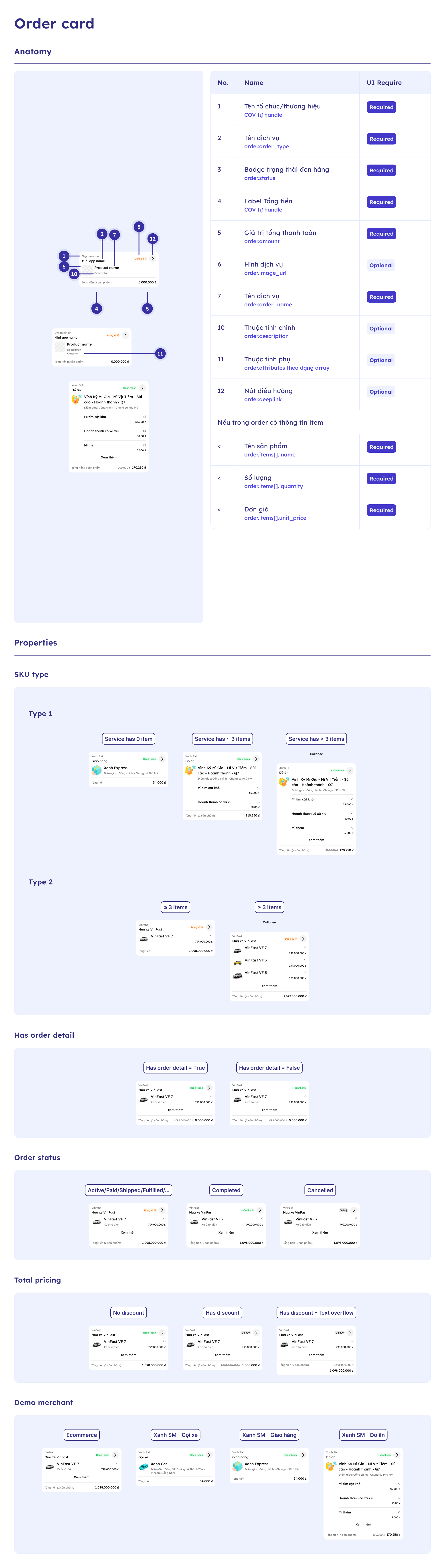
Yêu cầu quan trọng:
- PnL bắt buộc phải mapping đúng
order_typevà tuân thủ format thống nhất chometadata,order.attributesvàitems[].attributestheo từng loại đơn hàng - Giá trị trong
attributesvàmetadatalà động theo từngorder_type, theo dạng key-value và theo nghiệp vụ của các bên - Để hiển thị đúng trên Mobile, các team cần cung cấp các field chính (key) để hệ thống biết extract key nào để hiển thị lên mobile
- COV sẽ sử dụng các thông tin này để render Order Card trên mobile theo đúng chuẩn thiết kế
- Đặc biệt với case 0 SKU: Khi order không có items, cần sử dụng
order.attributesđể cung cấp thông tin mô tả order cho Order Card
Các trường hợp sử dụng:
- Order Card hiển thị: Tên dịch vụ (
order.order_type), trạng thái đơn hàng (order.status), thông tin sản phẩm (items[].name,items[].image_url), thuộc tính (items[].description,items[].attributes), tổng tiền (order.amounts.total_amount) - 0 SKU: Order không có items cụ thể, hiển thị
order.order_namevàorder.attributes(thuộc tính mô tả order như pickup_location, dropoff_location, estimated_duration...) - 0 SKU + category: Khuyến nghị truyền thêm
order.category_codevàorder.category_nameđể phân loại đơn hàng ở cấp order (không phụ thuộc item). - 1 SKU: Order có 1 item, hiển thị đầy đủ thông tin sản phẩm từ
items[].attributes - > 1 SKU: Order có nhiều items, hiển thị dạng collapse/expand với "Xem thêm"
Lưu ý:
- Format chi tiết và danh sách các field chính (key) cần truyền trong
metadata,order.attributesvàitems[].attributescho từngorder_typesẽ được cung cấp trong tài liệu riêng hoặc thông qua DevCenter - PnL cần liên hệ với team COV để được hướng dẫn các key bắt buộc cần truyền cho
order_typecủa mình để hệ thống có thể extract và hiển thị đúng trên mobile - Việc không cung cấp đầy đủ các key chính hoặc không tuân thủ format có thể dẫn đến hiển thị sai hoặc thiếu thông tin trên mobile
- Phân biệt
metadatavsattributesở order level:order.metadata: Thông tin nghiệp vụ/quản lý (dealer_code, sales_agent, contract_type, vat_rate...) - không hiển thị trực tiếp trên Order Cardorder.attributes: Thuộc tính mô tả để hiển thị trên UI (pickup_location, dropoff_location, estimated_duration, delivery_date...) - hiển thị trên Order Card
Ví dụ minh họa:
// VINFAST_PURCHASE - Mua xe VinFast
{
  "order": {
    "order_type": "VINFAST_PURCHASE",
    "items": [{
      "name": "VinFast VF 7",
      "attributes": {
        "model": "VF7",
        "variant": "Premium",
        "color": "Xanh SM",
        "vin_number": "VF7XXXXX"
      }
    }],
    "metadata": {
      "dealer_code": "VF_HN_001",
      "dealer_name": "Đại lý VinFast Hà Nội",
      "sales_agent": "VN001",
      "contract_type": "PURCHASE"
    }
  }
}

// TRANSPORTATION - Gọi xe
{
  "order": {
    "order_type": "TRANSPORTATION",
    "items": [{
      "name": "Gọi xe",
      "attributes": {
        "vehicle_type": "CAR",
        "distance": "15.5 km"
      }
    }],
    "attributes": {
      "pickup_location": "123 Đường ABC",
      "dropoff_location": "456 Đường XYZ",
      "estimated_duration": "25 phút"
    },
    "metadata": {
      "driver_id": "DRV_001",
      "booking_channel": "SuperApp"
    }
  }
}

// TRANSPORTATION - Gọi xe (0 SKU case)
{
  "order": {
    "order_type": "TRANSPORTATION",
    "order_name": "Gọi xe từ A đến B",
    "category_code": "CAT_TRANSPORTATION",
    "category_name": "Transportation",
    "attributes": {
      "pickup_location": "123 Đường ABC",
      "dropoff_location": "456 Đường XYZ",
      "estimated_duration": "25 phút",
      "vehicle_type": "CAR",
      "distance": "15.5 km"
    },
    "metadata": {
      "driver_id": "DRV_001",
      "booking_channel": "SuperApp"
    }
  }
}
8.5 Retry Strategy (Khuyến nghị)
| HTTP Status | code | Retry? | Strategy |
|---|---|---|---|
200 | 0 | No | Success - không cần retry |
400 | 4000 | No | Fix validation và gửi lại |
401 | 4101 | No | Fix secureHash và gửi lại |
401 | 4201 | No | Fix API Key và gửi lại |
409 | 4002 | Yes | Generate UUID mới và retry ngay |
409 | 4503 | No | Stale event - không retry |
429 | 4901 | Yes | Wait 60s → retry |
500 | 5000 | Yes | Exponential backoff (1s, 2s, 4s, 8s, 16s) |
8.6 Retry Mechanism - Xử lý Sync Thất Bại
Vấn đề: MiniApp BE tạo/update đơn thành công nhưng không sync thành công sang COV (mất mạng, lỗi hệ thống, timeout, etc.). Trong trường hợp này:
- Khách hàng thấy đơn trên MiniApp nhưng không thấy trên SuperApp
- Đơn hàng tồn tại trong hệ thống PnL nhưng chưa có trong COV hoặc dữ liệu không đồng bộ
Hai chiến lược Retry:
Chiến lược 1: Retry với Event Timestamp gốc (Giữ nguyên thứ tự)
Mục đích: Giữ nguyên thứ tự event, chỉ sync lại event đã bị lỗi.
Cách làm:
- Sử dụng
event_timestampgốc (thời điểm event thực sự xảy ra) - COV sẽ accept nếu chưa có event nào với timestamp đó
- Nhược điểm: Nếu đã có event mới hơn trong COV → sẽ bị reject do "stale event"
Ví dụ:
T1 (10:00:00): Update order → event_timestamp = 1731582000000
T2 (10:00:01): Gửi webhook → FAILED (mất mạng)
T3 (10:05:00): Retry với event_timestamp = 1731582000000 (gốc) → SUCCESS
Chiến lược 2: Retry với Event Timestamp mới (Ghi đè dữ liệu)
Mục đích: Ghi đè dữ liệu hiện tại trong COV bằng dữ liệu từ event bị lỗi.
Cách làm:
- Sử dụng
event_timestampmới (timestamp hiện tại khi retry) - COV sẽ accept và ghi đè lên event cũ hơn
- Lưu ý: Chỉ dùng khi muốn force sync lại dữ liệu, không giữ nguyên thứ tự event
Ví dụ:
T1 (10:00:00): Update order → event_timestamp = 1731582000000
T2 (10:00:01): Gửi webhook → FAILED (mất mạng)
T3 (10:05:00): Update order mới → event_timestamp = 1731582300000 → SUCCESS (đã sync)
T4 (10:10:00): Retry event 10:00 với event_timestamp = 1731582600000 (mới) → SUCCESS (ghi đè dữ liệu 10:05)
Khi nào dùng chiến lược nào:
- Chiến lược 1 (timestamp gốc): Khi muốn giữ nguyên thứ tự event, chỉ sync lại event bị lỗi
- Chiến lược 2 (timestamp mới): Khi muốn force sync lại dữ liệu từ event bị lỗi, ghi đè lên dữ liệu hiện tại
Best Practice:
- Implement retry queue với exponential backoff
- Lưu trữ event gốc với metadata (event_timestamp gốc, payload, retry_count)
- Retry tối đa N lần (ví dụ: 5 lần) với timestamp gốc
- Nếu vẫn fail sau N lần → có thể chuyển sang dùng timestamp mới để force sync
- Monitor và alert khi có nhiều event retry liên tục